

2024 Dodge Ram 3500 Crew Cab v 1.0.2.0

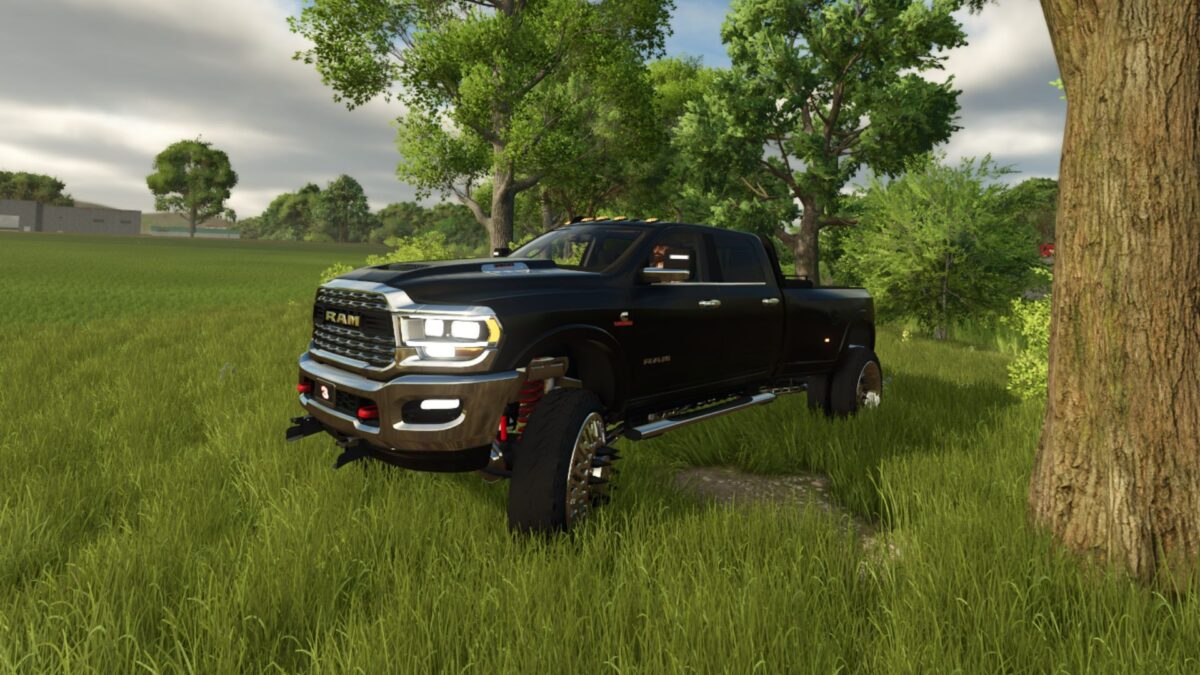
2024 Dodge Ram 3500 Crew Cab v 1.0.2.0

Features:
4 Engine Setups
Color Selectable
19 Wheel Setups
3 Rack Options/Led Light Bars
Works in multiplayer
4 Passenger enabled
Camlocker/Fuel Transfer Tank/Truck Bed Subwoofers/Amp Options
Nerf Bars/Train Horn/2 Hood Ornament Option
2 Plow Mount Option
4 Truck Bed/Flatbed/Service Bed Options/US License Plate Holder Options
Fuel Transfer/Equipment fill Capable
Fender Flare/Cab Subwoofer/Amp Options
Chainsaw Storage
Selectable Front Novelty Plates
Working Winch/Cb Radio/Strobe Light Roof Bar/Inner Detail Options
2 Front Bumper/Grill Options/US License Plate Holder Options
2 Camper Shell/and Tonneau Cover Options
Windshield Visor/Inner Detail Options
6 Exhaust Options
2 Drop Hitches/5th Wheel/Gooseneck attachment Options
Badge & Decal Options
10 Different Logo Options
2 Capacity Options
Version 1.0.2.0:
* Fixed the Texture Errors and its ability to transport fuel
FSMR, wheelman, HuiaModifications
How do I install Farming Simulator mods?
Find a mod that you like and want to download first. Then, on your PC, download a mod. Mods are typically in.zip format. However, it is sometimes in.rar format. If the mod file is in.zip format, no additional actions are required. If a file is in.rar format, you must unarchive it using software such as WinRar or Zip7. Windows 10 users do not need to use archive software; Win10 includes an unarchive feature.
The next step is to locate the mods folder on your computer. It is typically found in Documents/My Games/Farming Simulator [Your FS game version, e.g. 2022]. Open the "mods" folder and place the downloaded.zip archive or unarchived.rar file there.
The final step. Have fun with Farming Simulator mods!