

Factory Week Schedule v 1.0

Factory Week Schedule v 1.0
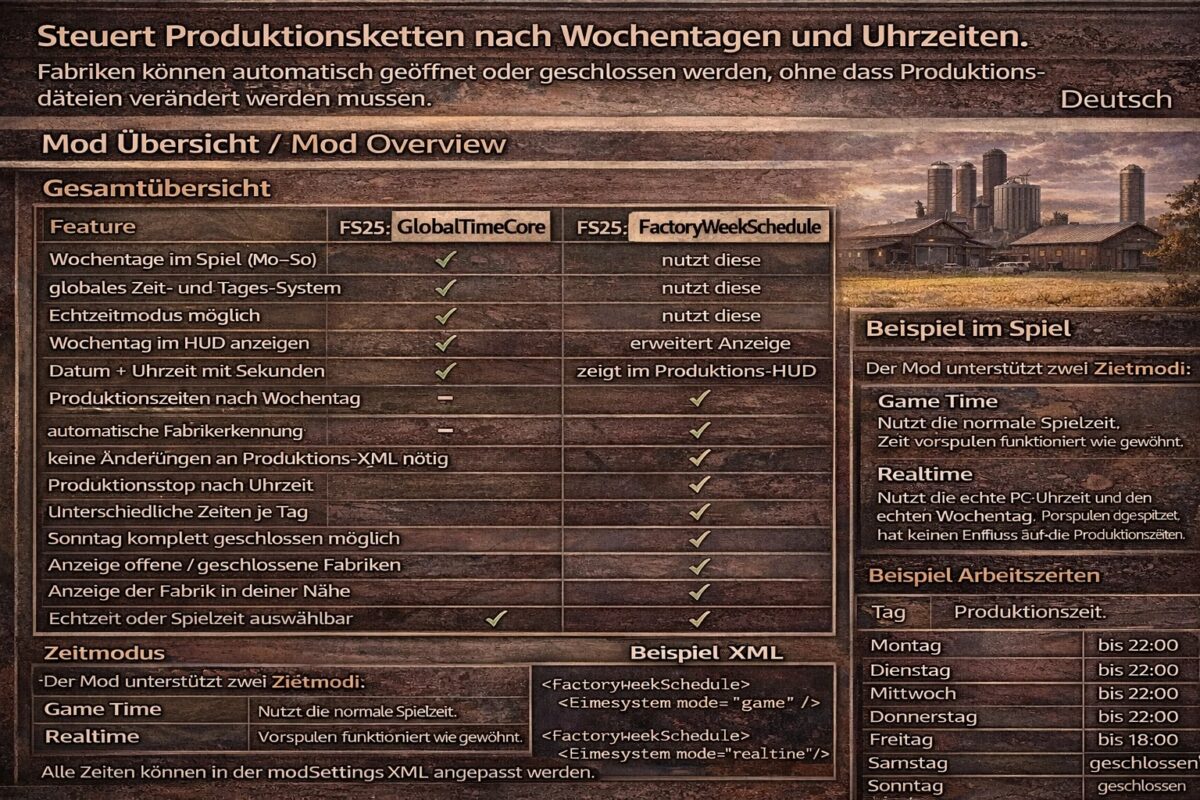
Controls production chains by day of the week and time of day. Factories can be automatically opened or closed without having to modify production files.
Manufacturers can automatically open or close factories without requiring any changes to production files.
Mod Overview
Feature FS25_GlobalTimeCore FS25_FactoryWeekSchedule
Days of the week in the game (Mon-Sun)
Global time and day systes
Real-time mode possible
Show day of the week in the HUD
Extended display
Date + time with seconds
Shows production times by day of the week in the production HUD
Automatic factory detection
No changes to production XML required
Production stop by time
Different times per day
Completely closed on Sundays possible
Display open/closed factories
Display of the next closure
Display of the factory nearest you
Real-time or game time selectable
Configuration via modSettings XML
Closing times adjustable via XML
Time mode
The mod supports two time modes:
Game Time: Uses the normal game time. Time fast-forwarding works as usual.
Realtime: Uses the real PC time and the real day of the week. Game time fast-forwarding has no effect on production times.
The time mode can be changed in the modSettings XML file.
Game Time: Uses the real PC time and the real day of the week.
Example Working Hours
Day Production Time
Monday until 10:00 PM
Tuesday until 10:00 PM
Wednesday until 10:00 PM
Thursday until 10:00 PM
Friday until 6:00 PM
Saturday until 6:00 PM
Sunday closed
All times can be adjusted in the modSettings XML file.