

Live Farmer v 1.7.1

Live Farmer v 1.7.1
A full fledged farmer’s life system adds new parameters to the game:
Satiety and Vigor.
Now the player needs to eat and rest to stay in shape.
The mod turns ordinary farming into a real farm survival simulator, but without going overboard – everything is balanced and convenient for everyday play.
KEY FEATURES
Satiety.
Gradually decreases every game hour. (there is a choice in the settings)
Complete exhaustion causes:
Sounds of rumbling in the stomach;
Blurred effects and screen dimming;
Slowing down movement;
Random “hunger attacks” with vignette and sounds.
Vigor (Vigor)
It is taken away over time. (there is a choice in the settings)
Restores during sleep (10–15% for each hour of sleep).
When your energy level is low:
It becomes more difficult to walk and operate equipment;
The screen darkens, the effect of fatigue appears;
The player can “fall asleep while walking.”
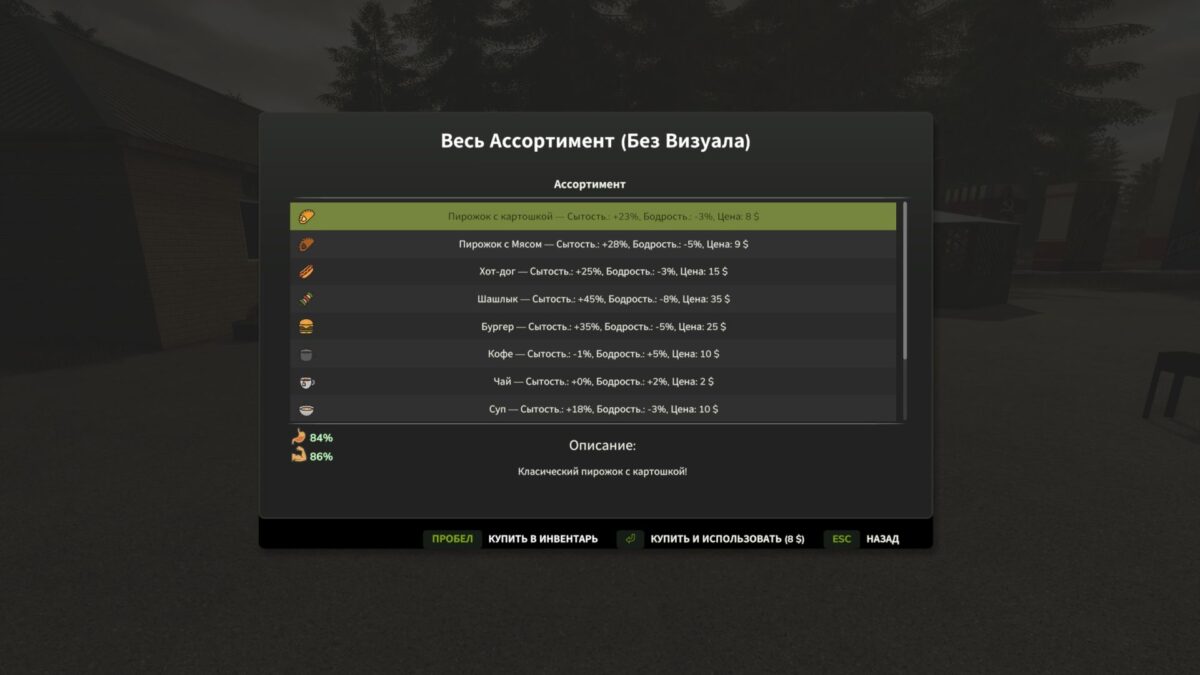
There is a category for Meal Stations in the construction menu.
The mod has an inventory and a backpack for items!
Various buildings for buying and preparing food.
There are already a variety of food items such as:
– Burger
– Shish kebab
– Coffee
– Tea
– Soup
– Energetic
– Beer
– Vodka
– Pies
– And others
Version 1.7.1:
* Added a new parameter Need (toilet)
* The hud has been redesigned, now it has three parameters in one line
* Added the ability to select huda scale
* Hud can be moved, open the default inventory RCTRL (if you didn’t change it in the settings), hold down on the hud and drag it to the desired location. Basically you need a cursor on the screen and you can move the hud
* Added choice of hud vertical or horizontal
* Slightly improved inventory appearance