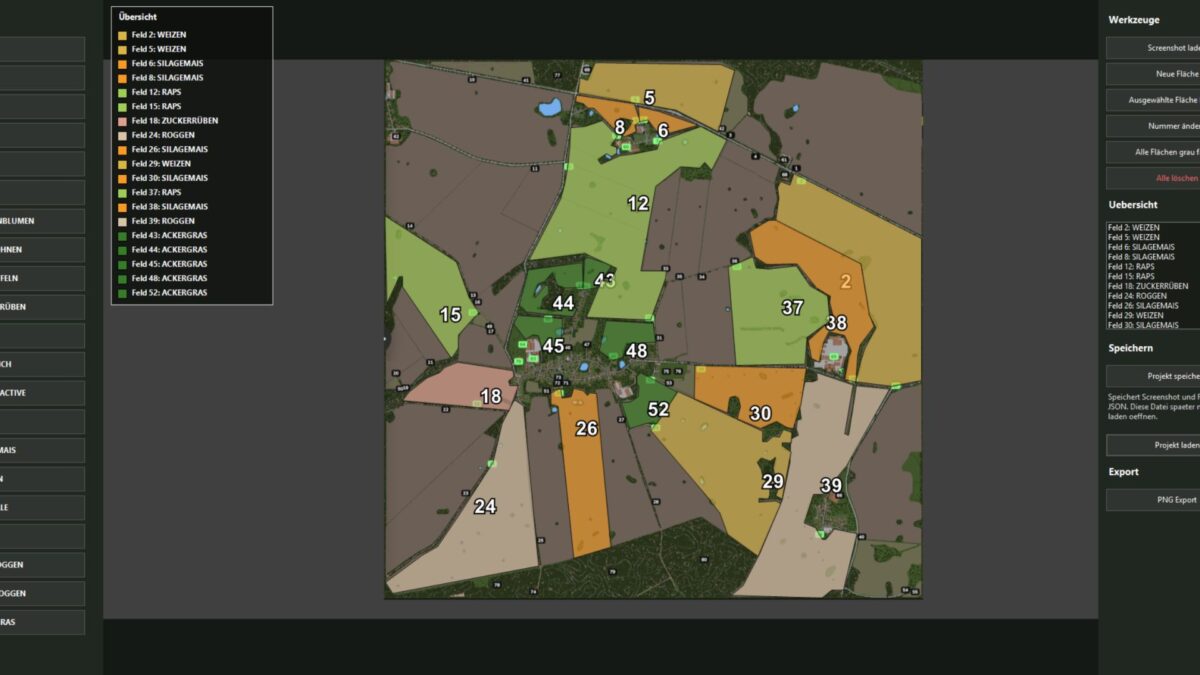
Crop Planner Program v 1.0
The KTD Agrar crop planner is a simple Windows tool for visually planning crop areas.
Based on a loaded screenshot or map image, field areas can be drawn, numbered and colored with crops.
The tool offers a clear list of areas, automatically sorts the fields by number and shows the current occupancy directly in the plan.
Projects can be saved and reloaded later.
The finished cultivation plan can be exported as a PNG, including an area overview in the image.
KTDAGRAR
How do I install Farming Simulator mods?
Find a mod that you like and want to download first. Then, on your PC, download a mod. Mods are typically in.zip format. However, it is sometimes in.rar format. If the mod file is in.zip format, no additional actions are required. If a file is in.rar format, you must unarchive it using software such as WinRar or Zip7. Windows 10 users do not need to use archive software; Win10 includes an unarchive feature.
The next step is to locate the mods folder on your computer. It is typically found in Documents/My Games/Farming Simulator [Your FS game version, e.g. 2022]. Open the "mods" folder and place the downloaded.zip archive or unarchived.rar file there.
The final step. Have fun with Farming Simulator mods!