

Messenger v 1.0.0.3

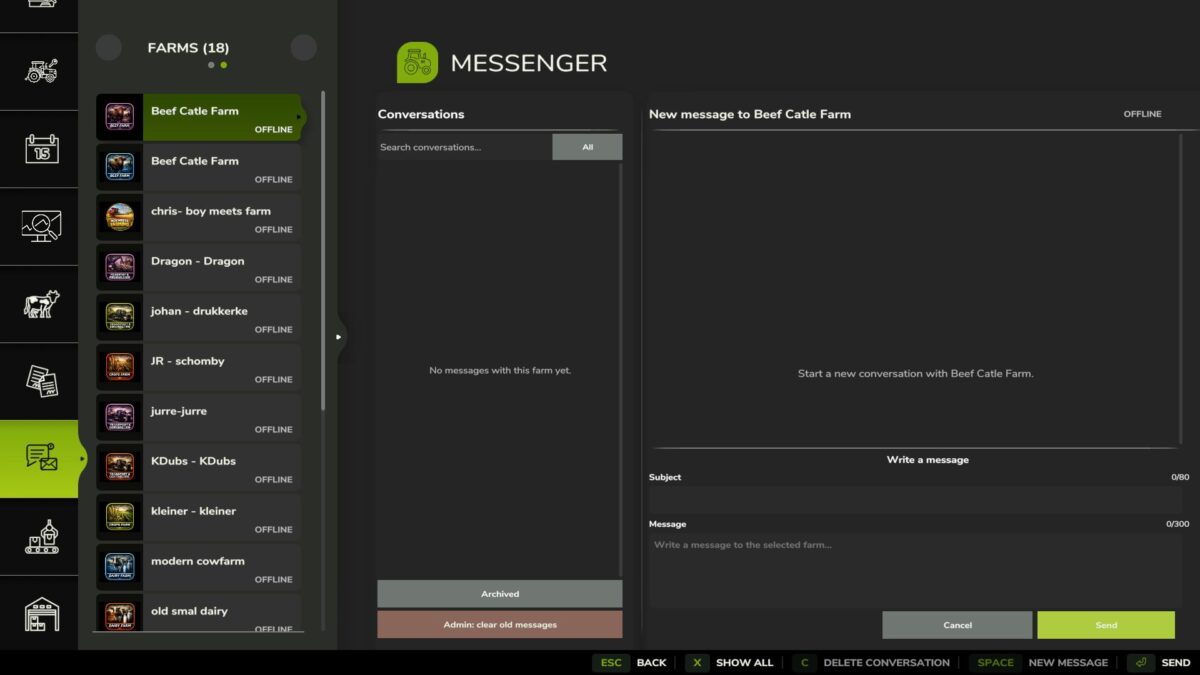
Messenger v 1.0.0.3

Messenger adds a server-managed mailbox for messages between farms in Farming Simulator 25.
Features:
Send messages with a subject between farms.
Persistent offline delivery after reconnecting or restarting the server.
Uses actual server time for message ordering, with the newest messages shown first.
Farm online status and unread message notifications.
Search conversations and filter by unread messages.
Pin, mute, archive, restore, and delete conversations.
Farm members can manage their own conversations.
Server admins can clean up old messages.
Server admins can send a persistent announcement to every valid player farm.
Scalable interface styled after the native GIANTS menus.
Multiplayer and dedicated server support.
Mailbox data is stored in the savegame.
PC/Mac only.
dafke1305
How do I install Farming Simulator mods?
Find a mod that you like and want to download first. Then, on your PC, download a mod. Mods are typically in.zip format. However, it is sometimes in.rar format. If the mod file is in.zip format, no additional actions are required. If a file is in.rar format, you must unarchive it using software such as WinRar or Zip7. Windows 10 users do not need to use archive software; Win10 includes an unarchive feature.
The next step is to locate the mods folder on your computer. It is typically found in Documents/My Games/Farming Simulator [Your FS game version, e.g. 2022]. Open the "mods" folder and place the downloaded.zip archive or unarchived.rar file there.
The final step. Have fun with Farming Simulator mods!