

RPM Work Mode v 2.4.4.5


RPM Work Mode v 2.4.4.5

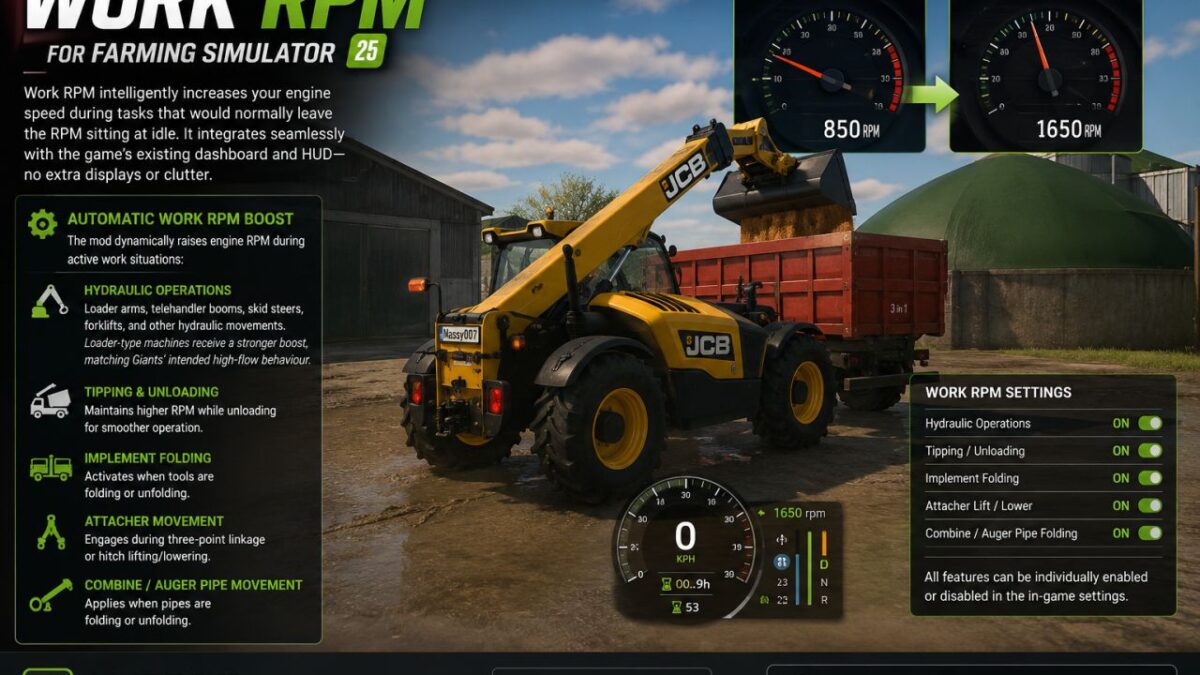
Work RPM intelligently increases your engine speed during tasks that would normally leave the RPM sitting at idle.
It integrates seamlessly with the game’s existing dashboard and HUD no extra displays or clutter.
What It Does
Automatic Work RPM Boost
While you are in control of a vehicle from the cab, the mod dynamically raises engine RPM during active work situations:
Hydraulic Operations
Loader arms, telehandler booms, skid steers, forklifts, and other hydraulic movements.
Loader-type machines receive a stronger boost, matching Giants’ intended high-flow behaviour.
Tipping & Unloading
Maintains higher RPM while unloading for smoother operation.
Implement Folding
Activates when tools are folding or unfolding.
Attacher Movement
Engages during three-point linkage or hitch lifting/lowering.
Combine / Auger Pipe Movement
Applies when pipes are folding or unfolding.
Customisation
All features can be individually enabled or disabled in the in-game settings, giving you full control over how the system behaves.
Version 2.4.4.5:
* Another update is out, bringing a bunch of fixes and improvements
* Because apparently fixing one thing just unlocks three more things to fix
* Fixed settings getting stuck on NO and refusing to go back to YES
* Settings no longer reload from disk every time you open the menu
* Toggle states now read correctly
* HUD now properly disappears when removed/disabled instead of deciding it lives there permanently
* Fixed the solid white settings box
* Fixed dark row colours not being applied properly
* Fixed missing l10n/translation labels
* Fixed vehicles not revving correctly
* Restored PTO / tach lift
* Fixed conflicts with Yield Control and additional Game Settings
* Made settings, HUD and motor hooks safer
* Fixed telehandler/frontloader RPM getting stuck at max after hydraulics stop
LM Modding Store, kenny456
How do I install Farming Simulator mods?
Find a mod that you like and want to download first. Then, on your PC, download a mod. Mods are typically in.zip format. However, it is sometimes in.rar format. If the mod file is in.zip format, no additional actions are required. If a file is in.rar format, you must unarchive it using software such as WinRar or Zip7. Windows 10 users do not need to use archive software; Win10 includes an unarchive feature.
The next step is to locate the mods folder on your computer. It is typically found in Documents/My Games/Farming Simulator [Your FS game version, e.g. 2022]. Open the "mods" folder and place the downloaded.zip archive or unarchived.rar file there.
The final step. Have fun with Farming Simulator mods!