

Excavators Tracks Position v 1.1

Excavators Tracks Position v 1.1
About the mod:
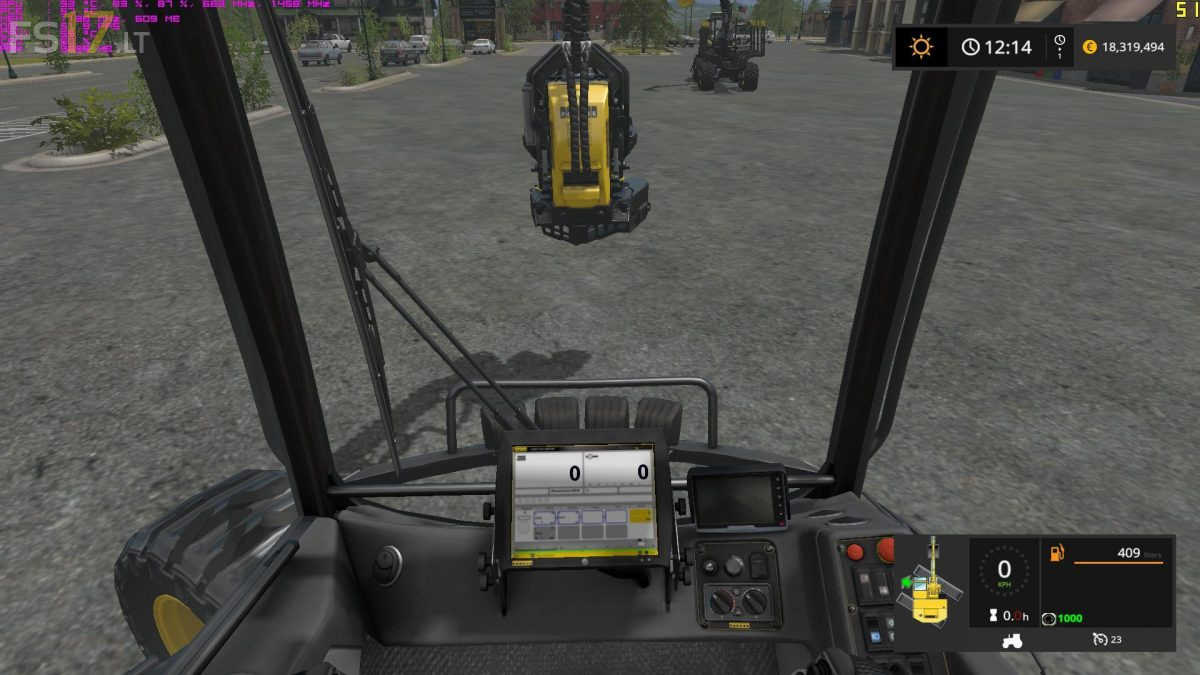
This mod show you current position of tracks against the cab of your excavator.
So when using indoor camera, you can easily know, where your vehicle will move, when you press throttle pedal. Mod is loaded to all vehicle with spec. “drivable”, which have movingTool “AXIS_CRANE_TOOL” or “AXIS_FRONTLOADER_TOOL” or “AXIS_CRANE_ARM” or “AXIS_FRONTLOADER_ARM” with no limit rotation.
– Position is showed in small icon next to speedometer
– Green arrow icon shows direction of move
– You can reverse direction by pressing “KEY_KP_minus”, if direction is displayed opposite (e.g. Ponsse Buffalo)
– Reversed direction will be save for each vehicle in savegame
Version 1.1:
* Small fixes
Credits:
kenny456
video review of this mod:
https://www.youtube.com/watch?v=gOAn-FOMRDI