

Broken Road Addition to Road Pack v 1.0

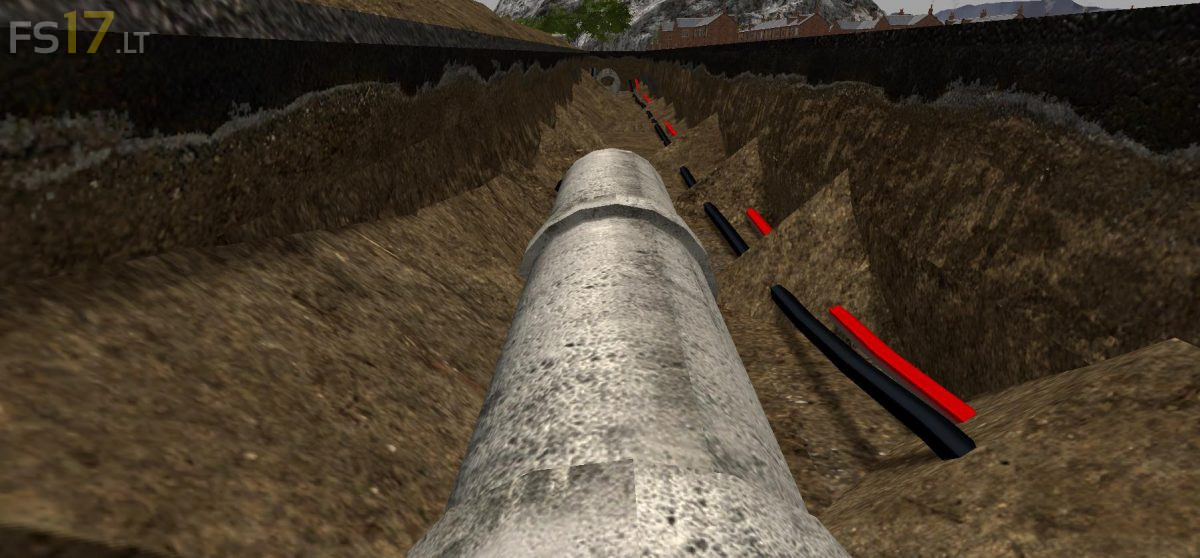
Broken Road Addition to Road Pack v 1.0
A broken road addition to the RoadPackKit, it is shown with the dark road texture but works with all as it’s just a mere swap of the original diffuse maps, the normal and specular are the same.
Firstly this model is high in vert’s approx 4173, so added 3 LOD’s to keep this user friendly.
First LOD0 = 4173 vert’s and clip distance set at 50
Second LOD1 = 1257 vert’s and clip distance set at 110
ThirdLOD2 = 371 vert’s and clip distance set at 550.
This little broken road kit comes with a separate underground pipe, that is not made with LOD’s as there should only be a few of these aside the road for decoration, there are decorative pipes in the ground which will reduce in detail the further you pan out, but hopefully not noticeable to the eye. If you already have the road pack kit within your map, just open the i3d with notepad / ++ and make the texture path the same as the textures for your road pack kit, this will mean the only thing you will have to place into your map files are the 50mBrokenRoadSection.i3d and the shapes files. Once these are into your map without errors, save the game and exit then delete the 50mBrokenRoadSection.i3d and the shapes files from your map and then re open to make sure all is good and again No errors or warnings. There is also a line plane added for this part of the road only, without the centre markings due to the hole in the ground, make sure this is kept within the broken road when moving, make sure to select the whole transform group and not just the road. In the pictures you can see how the terrain can be placed to make it look like this hole has been dug and little patches of terrain left behind for realism, if it’s left as a complete square like it’s modelled then it may look a little false, so please have a play with the terrain for your best look.