Farming Classics Pack v 1.0

FS19 mods

About the mod:

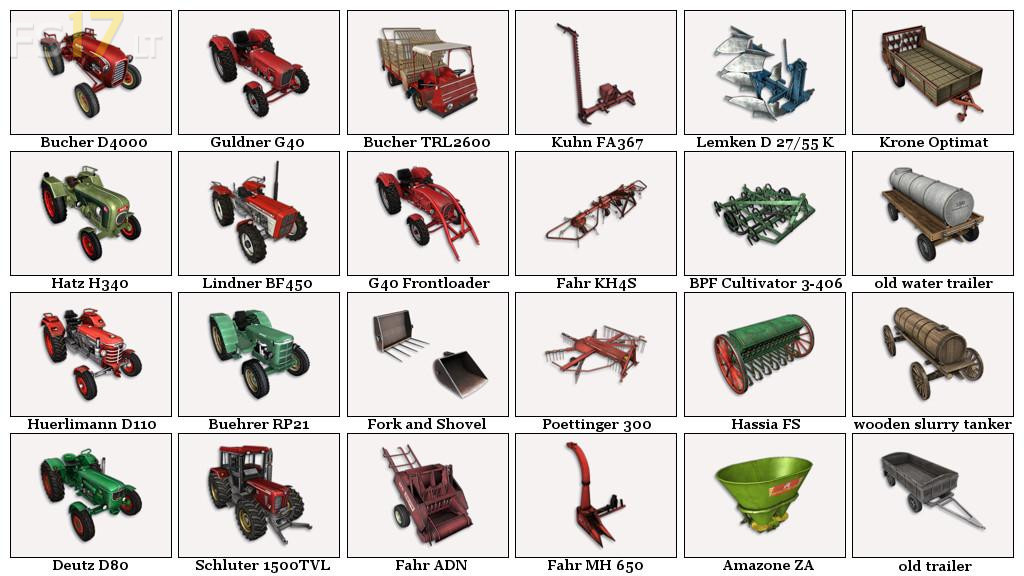
The Pack consist of:

10 Historical Vehicles:
– Bucher D4000
– Buehrer RP21
– Deutz D80
– Guldner G40
– Guldner G40 Frontloader
– Hatz H340
– Huerlimann D110
– Lindner BF450
– Bucher TRL2600
– Schluter 1500TVL

15 Historical Tools:
– Amazone ZA
– BPF Cultivator 3-406
– Fahr KH 4 S
– Fahr MH 650
– Fahr ADN
– Hassia FS
– Lemken D 27/55 K
– Kuhn FA367
– Krone Optimat
– Poettinger 300
– Old water trailer
– Old trailer
– Wooden slurry tanker
– Frontloader Fork and Shovel

Credits:
Dogface

How to install FS17 mods?

Firstly find a mod which you like and want to download. Then download a mod to your PC. Mods are usually in .zip format file. But sometimes it can be in .rar. If a mod file is a .zip format no needed additional actions. If a file is in .rar, then you must unarchive mod with software like WinRar or Zip7. Windows 10 users no need to use software for archives, Win10 itself has a feature to unarchive files.

The next step is to find mods folder in your PC. Usually, it is in Documents/My Games/Farming Simulator 17/2017. Open the "mods" folder and put downloaded .zip archive or unarchived .rar file to this folder.

Last step. Enjoy of FS17 mods!

3 thoughts on “Farming Classics Pack v 1.0”

  • Ignas says:
    2018-07-10 at 07:28

    Thank you! Miss the ol’ days of FS13. 😀

  • suck a cock says:
    2018-07-12 at 11:52

    I like this pack!!
    10 stars

  • Hehe says:
    2021-02-18 at 02:27

    Doesn’t work anyomre

Leave a Reply

Your email address will not be published. Required fields are marked *