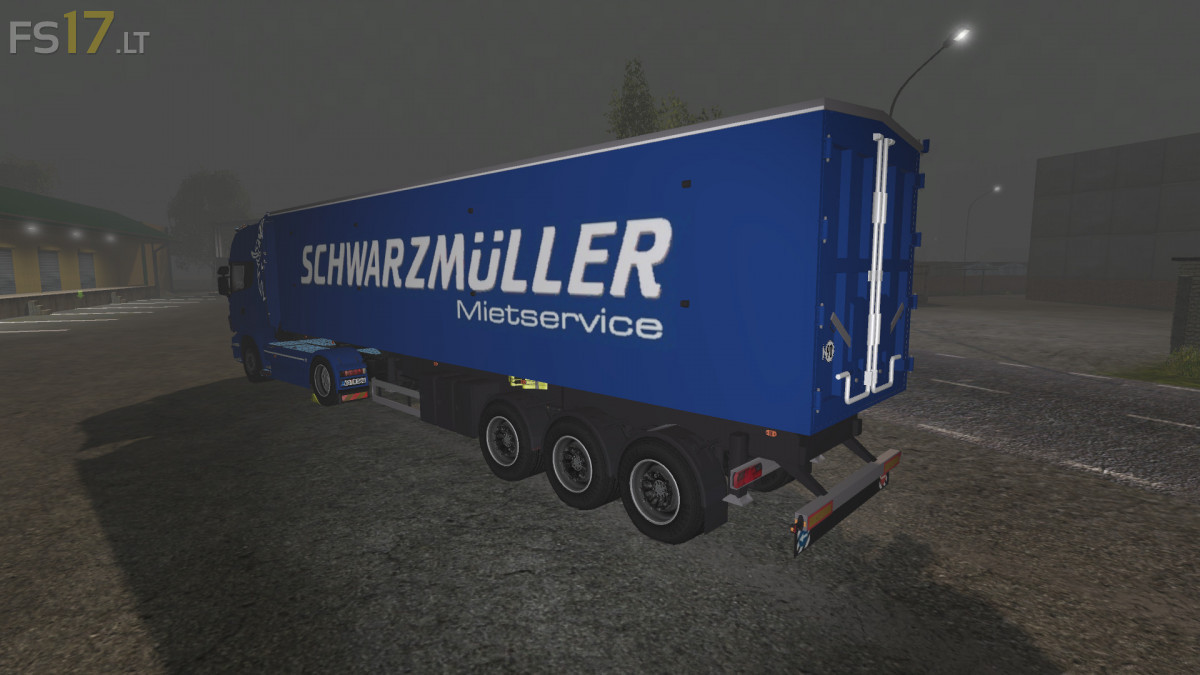
Scania R560 + Schwarzmuller Trailer v 1.0

FS19 mods

About the mod:

– Engine Setup: 410 hp, 500 hp, 560 hp
– Wheel Setup: Original Wheels, Custom Wheels
– Design: No Headlight Ramp, Headlight Ramp Up, Headlight Ramp Down, Headlight Ramp Down / Up, Large Equipement Light
– Included Schwarzmuller Trailer: capacity 76000 liters

Credits:
Repi, Scania Power, Dimanix, Aramis, L'Affreux Moddeur, Ifko, Modelleicher, rafftnix

How to install FS17 mods?

Firstly find a mod which you like and want to download. Then download a mod to your PC. Mods are usually in .zip format file. But sometimes it can be in .rar. If a mod file is a .zip format no needed additional actions. If a file is in .rar, then you must unarchive mod with software like WinRar or Zip7. Windows 10 users no need to use software for archives, Win10 itself has a feature to unarchive files.

The next step is to find mods folder in your PC. Usually, it is in Documents/My Games/Farming Simulator 17/2017. Open the "mods" folder and put downloaded .zip archive or unarchived .rar file to this folder.

Last step. Enjoy of FS17 mods!

3 thoughts on “Scania R560 + Schwarzmuller Trailer v 1.0

  • fstrc says:
    2017-02-13 at 15:08

    Nice,+but+too+much+smoke,+too+much+lights,+too+much+cameras,+too+much+swaying.

  • Лёха says:
    2017-02-16 at 05:28

    дерганье при поворотах.. и а авто пропадает . при пересадки в другое т.с . и обратно не сядешь.. в гараже он есть на карте нет.. исправьте плиз.. очень мод понравился…

  • jaki says:
    2017-03-15 at 21:15

    Error: Can’t load resource ‘C:/Users/Documents/My Games/FarmingSimulator2017/mods/Scania_R560_Schwarzmuller_Pack_FS17/dataS/scrip
    ts/vehicles/Vehicle.lua’.
      Register vehicle type: Scania_R560_Schwarzmuller_Pack_FS17.alukippmulde

Leave a Reply

Your email address will not be published. Required fields are marked *