

Case IH Magnum AFS US/EU Series v 2.0

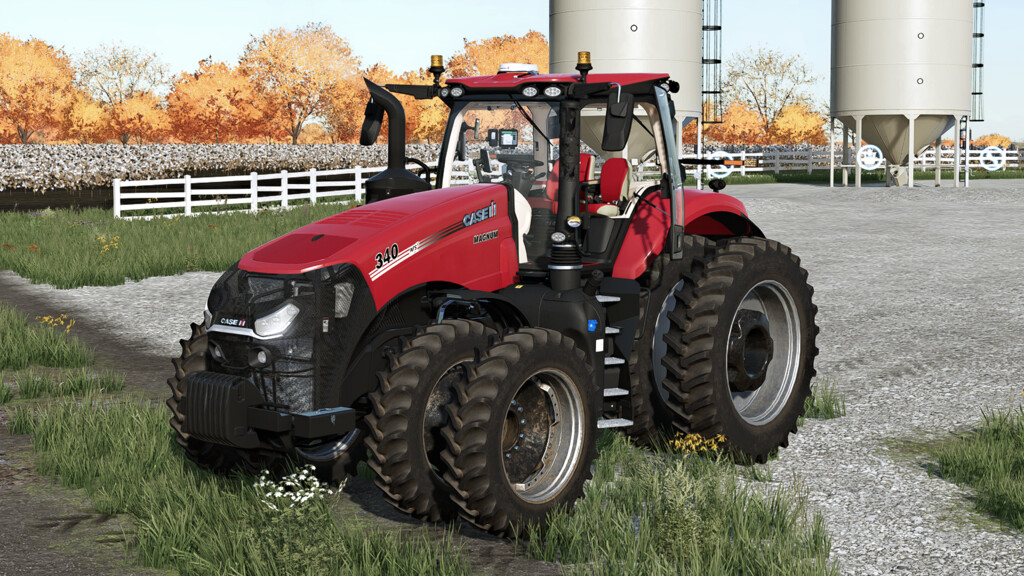
Case IH Magnum AFS US/EU Series v 2.0

Base Price: $312.000
AFS Connect with now correct US version besides EU version.
What’s new with US version?
– New rims
– 30in Row Crop configurations
– New Michelin and Lizard row crop wheel configurations
– LSW Tires
– US hitch
– US Quick 3 Point hitch
– US Front and Rear fenders
Other features added:
– Rim color selection
– Design color selection (RED or BLACK)
– Kinze monitors
– Door animation
– Steering base animation
Version 2.0:
* Added 250 HP, 280 HP and 310 HP engine options
* New CNH Rims
* Added 2 shades of grey for rims colors
* Added front inner rims color configuration
* Added rear fenders configurations
* Added seat color configuration
* Added exhaust color configuration
* Added 22-inch and 36-inch options
* Triples rear tires now available
* Added two new monitors (PP from KarlFarms)
* Corrected windows tint
* Added windows tint configuration
* Added beacon lights configurations
* Added front configurations (now weights option)
* Now, the tracked version is separated from the wheeled version in the store
* Isaria Pro Compact ready
Casearias Modding
Farming Simulator 22
How do I install Farming Simulator mods?
Find a mod that you like and want to download first. Then, on your PC, download a mod. Mods are typically in.zip format. However, it is sometimes in.rar format. If the mod file is in.zip format, no additional actions are required. If a file is in.rar format, you must unarchive it using software such as WinRar or Zip7. Windows 10 users do not need to use archive software; Win10 includes an unarchive feature.
The next step is to locate the mods folder on your computer. It is typically found in Documents/My Games/Farming Simulator [Your FS game version, e.g. 2022]. Open the "mods" folder and place the downloaded.zip archive or unarchived.rar file there.
The final step. Have fun with Farming Simulator mods!