

Factory Week Schedule v 2.0

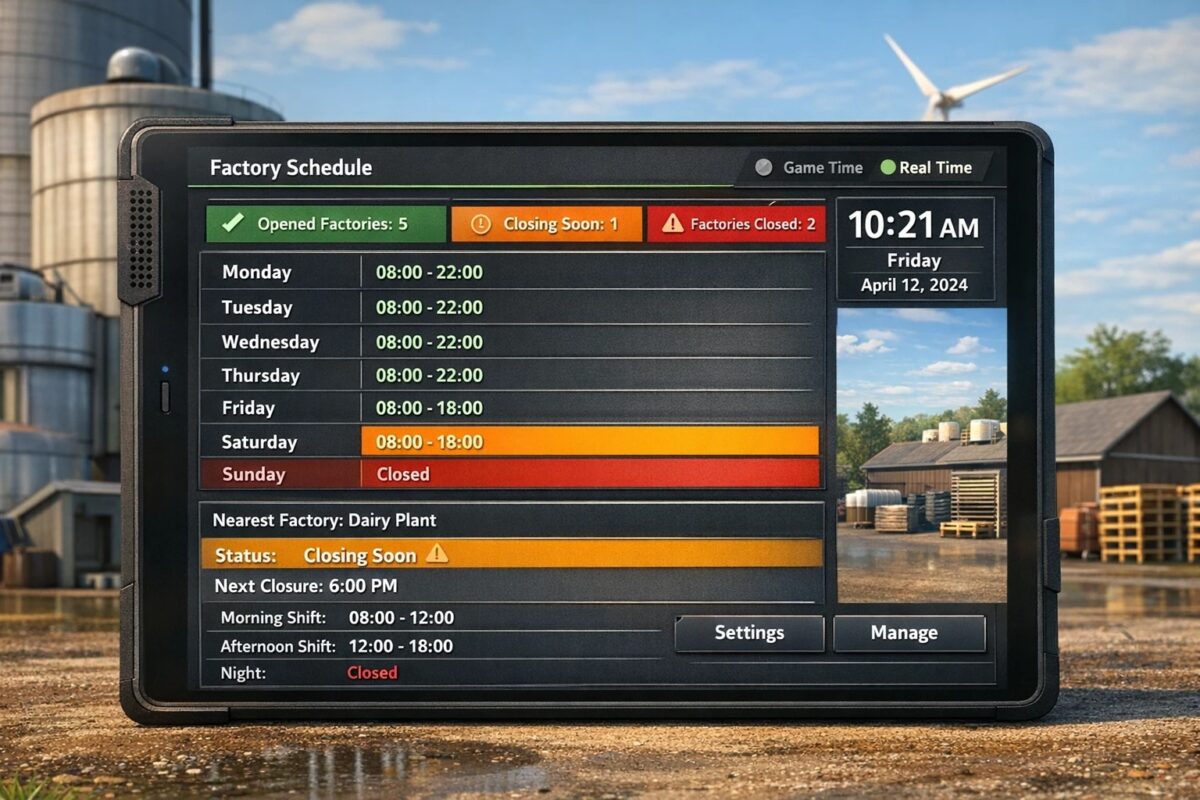
Factory Week Schedule v 2.0

Controls production chains by day of the week and time of day.
Factories can be automatically opened or closed without having to modify production files.
Mod Overview
Overview
Feature FS25_GlobalTimeCore FS25_FactoryWeekSchedule
Days of the week in the game (Mon-Sun) ✔ uses this
Global time and day system ✔ uses this
Real-time mode possible ✔ uses this
Show day of the week in the HUD ✔ Extended display
Date + time with seconds ✔ Shows production times by day of the week in the production HUD – ✔
Automatic factory detection – ✔
No changes to production XML required – ✔
Production stop by time – ✔
Different times per day – ✔
Completely closed on Sundays possible – ✔
Display open/closed factories – ✔
Display of the next closure – ✔
Display of the factory nearest you – ✔
Real-time or game time selectable ✔ ✔ Configuration via modSettings XML ✔ ✔
Closing times adjustable via XML – ✔
Time mode
The mod supports two time modes:
– Game Time: Uses the normal game time. Time fast-forwarding works as usual.
– Realtime: Uses the real PC time and the real day of the week. Game time fast-forwarding has no effect on production times.
The time mode can be changed in the modSettings XML file.
Game Time: Uses the real PC time and the real day of the week.
Example XML
Example Working Hours
Day Production Time
Monday until 10:00 PM
Tuesday until 10:00 PM
Wednesday until 10:00 PM
Thursday until 10:00 PM
Friday until 6:00 PM
Saturday until 6:00 PM
Sunday closed
All times can be adjusted in the modSettings XML file.
Version 2.0:
* Time System Combined realtime & game-time mode with centralized control
* Calendar Real weekday system (Mon–Sun) integrated
* Integration GlobalTime system fully integrated
* Architecture Completely reworked, single core system
* Weekly Schedule Individual working times for each weekday
* Worker System Workers, efficiency, wages, production impact
* Worker Events Illness, vacation, employee turnover
* Training Workers improve over time
* Factory Events Maintenance, breakdowns, inspections, overproduction
* Production Material monitoring & auto-pause
* Costs Dynamic wage system
* HUD Movable, scalable, customizable
* Save System Map-based settings & event persistence
* Multiplayer Enabled
* Performance Optimized, no duplicate systems
* Compatibility Reduced conflicts with other mods
Akita83
How do I install Farming Simulator mods?
Find a mod that you like and want to download first. Then, on your PC, download a mod. Mods are typically in.zip format. However, it is sometimes in.rar format. If the mod file is in.zip format, no additional actions are required. If a file is in.rar format, you must unarchive it using software such as WinRar or Zip7. Windows 10 users do not need to use archive software; Win10 includes an unarchive feature.
The next step is to locate the mods folder on your computer. It is typically found in Documents/My Games/Farming Simulator [Your FS game version, e.g. 2022]. Open the "mods" folder and place the downloaded.zip archive or unarchived.rar file there.
The final step. Have fun with Farming Simulator mods!