

Farm Pack – Tirschner v 1.0

Farm Pack – Tirschner v 1.0

A farm, from the heart of Bavaria. The original is located near Tirschenreuth, a town in the Upper Palatinate.
The courtyard has been built in an L-shape. Attached to the house is the old stable, which today only serves as a garage.
The house was completely renovated only a few years ago, the rest of the courtyard shows slight signs of age, which do not stand in the way of the appearance.
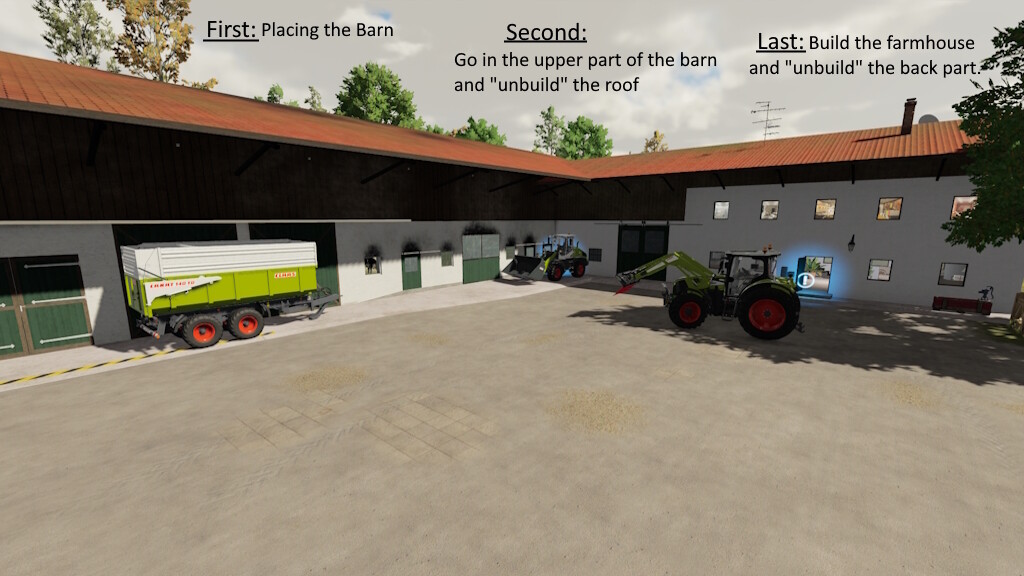
The house is walkable and is therefore also great for role-playing.On the upper floor you will find the trigger to fade in or out of the wall of the house. More on that later.
Directly adjacent to the old barn is the L-shaped farm wing of the farm.
There you will find the hayloft, which also has a bulk silo for hay bales, as well as the hayloft, which offers space for many bales or equipment.
Directly behind it is the open machine hall. It has the ideal lenght for parking a tractor with a trailer.
In order to be able to build both buildings together and independently of each other, a trigger is installed that displays the missing components.
The one for the apartment building is located on the upper floor of the house.
The one for the stable inside on the left as soon as you enter the high driveway.
Farm building:
Purchase price: 140.000$
Daily maintenance 50$ / day
Cowshed:
Capacity: 30 cows
– Feeding trough: Inside the building
– Straw: Inside the building
– Animal loading point: At the back door of the building
– Slurry loading point: Under the pipe at the back of the building
– Milk loading point: In the small building next to the barn.
Apartment building:
Purchase price: 100.000$
Daily maintenance: 5$ / day
– Cloakroom trigger upstairs
– Residential building trigger on the lower floor
Whole Farm:
Purchase price: 240.000$
Daily maintenance: 55$ / day
– specialisations similar to the ones above
– Gates can be recolored
– Buildings can be built independently of each other
– Lights in the building
Farmerfivetom
Farming Simulator 22
How do I install Farming Simulator mods?
Find a mod that you like and want to download first. Then, on your PC, download a mod. Mods are typically in.zip format. However, it is sometimes in.rar format. If the mod file is in.zip format, no additional actions are required. If a file is in.rar format, you must unarchive it using software such as WinRar or Zip7. Windows 10 users do not need to use archive software; Win10 includes an unarchive feature.
The next step is to locate the mods folder on your computer. It is typically found in Documents/My Games/Farming Simulator [Your FS game version, e.g. 2022]. Open the "mods" folder and place the downloaded.zip archive or unarchived.rar file there.
The final step. Have fun with Farming Simulator mods!