

Fendt 380 GTA v 1.1

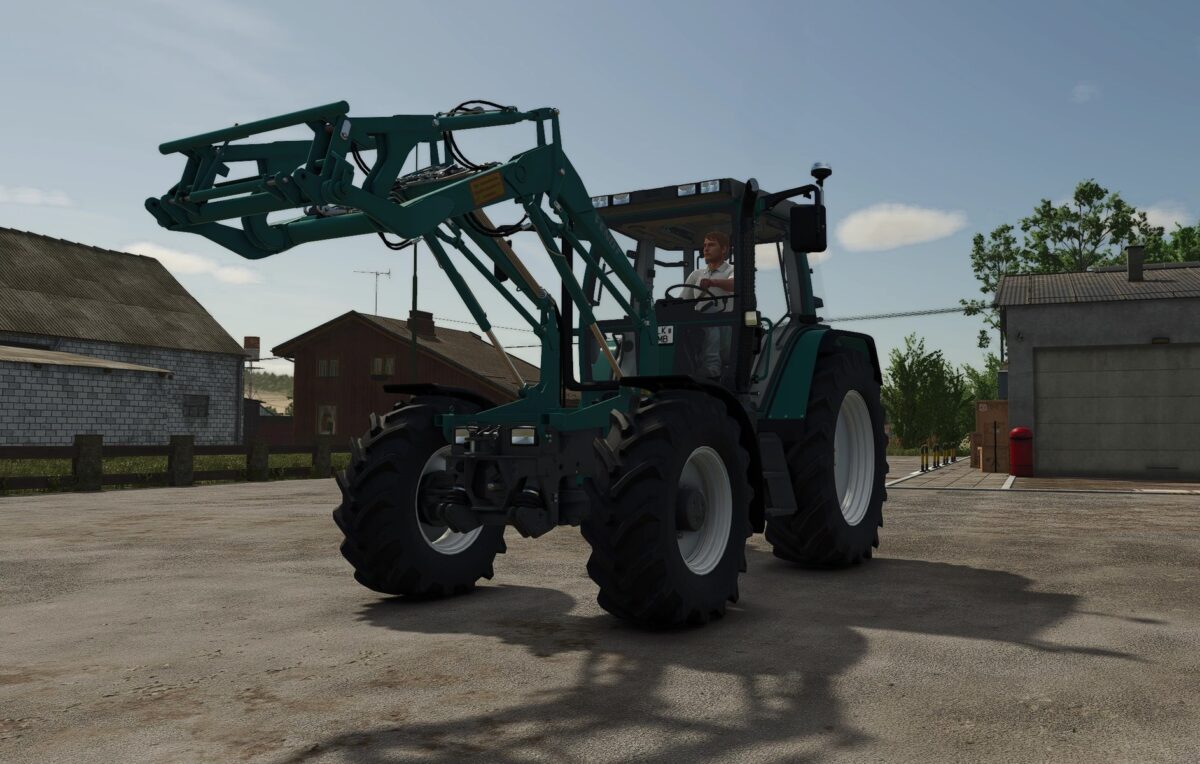
Fendt 380 GTA v 1.1

Features
Realistic driving physics with adjusted oscillating axle
Fully animated interior
Authentic weight and suspension behavior
Custom petrol blue paint job
Matching front loader included
Compatible with front tank and Rau Spridoport
Multiplayer capable
Technical Specifications
Fendt 380 GTA Turbo
Power: 95 hp
Top speed: 40 km/h
Category: Compact Tractors
Fendt GTA Front Loader
Price: €5,000
Rau Spridoport
Working width: 21 m
Working speed: 12 km/h
Rau Front Tank GTA
Capacity: 1450 liters
Version 1.1:
* Fix: Removed unnecessary screws
* Fix: Adjusted IC point for roof hatch
* New configurations
* Old rotating beacon left
* Old rotating beacon left and right
* LED rotating beacon left
* LED rotating beacon left and right
* Rotating beacon foldable via IC
* Mirrors foldable via IC
* Front fenders can be toggled on and off via IC
* Lighting completely reworked to halogen
* Interior lighting installed
* New rear work lights installed
* Minor adjustments
* Front windshield wipers now work
* Rear windshield wipers fixed
Dachau_Agrar
How do I install Farming Simulator mods?
Find a mod that you like and want to download first. Then, on your PC, download a mod. Mods are typically in.zip format. However, it is sometimes in.rar format. If the mod file is in.zip format, no additional actions are required. If a file is in.rar format, you must unarchive it using software such as WinRar or Zip7. Windows 10 users do not need to use archive software; Win10 includes an unarchive feature.
The next step is to locate the mods folder on your computer. It is typically found in Documents/My Games/Farming Simulator [Your FS game version, e.g. 2022]. Open the "mods" folder and place the downloaded.zip archive or unarchived.rar file there.
The final step. Have fun with Farming Simulator mods!