

Info Display Extension v 1.1

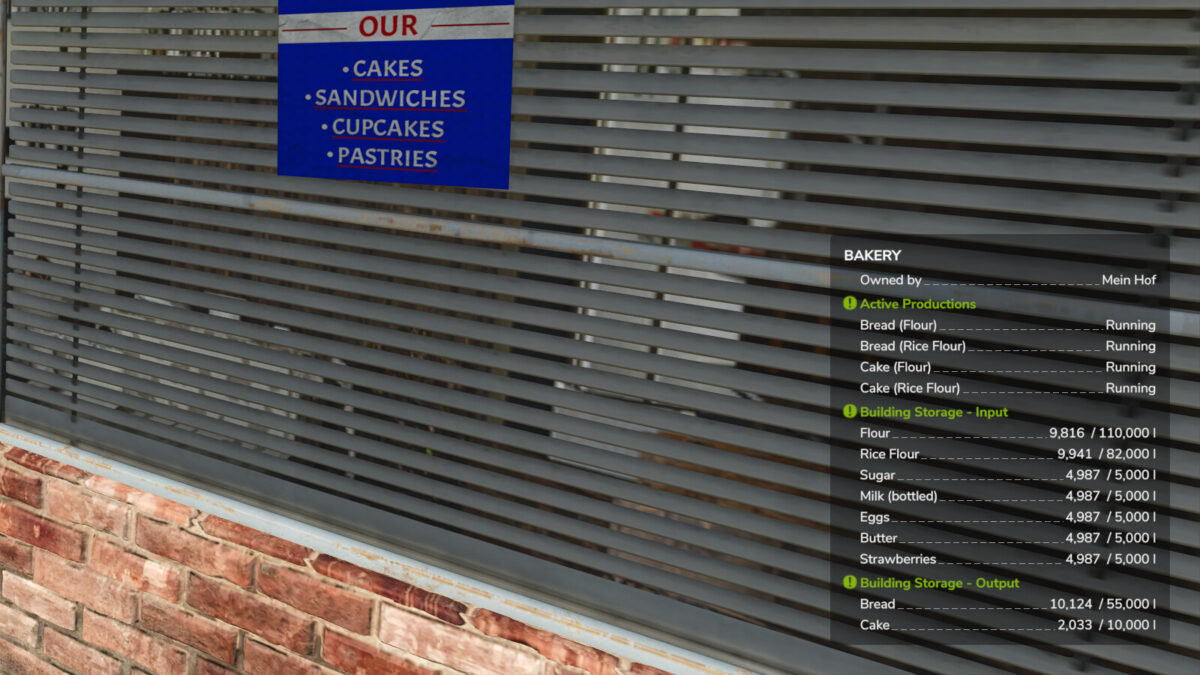
Info Display Extension v 1.1

A small mod to extend the displays.
Extends the Info Hud displays of
– silos
– Productions
– animal sheeds
– Manure heaps
– trees
– Vehicles and attachments
– Field growth
– Factories and event buildings
– Adds units of numbers where possible as not everything is in litres.
Version 1.1:
* Improved translations for DE and PL and new translations in PT and CS
* Show growth phase and maximum growth
* Lua bug fixed for trees in the last growth phase
* Vehicles now show shop category and current weight
* Added factories max. and progress indicator
* Event building displays extended
* Increased the standard entries displayed in the F1 menu (thanks to HoFFi)
* Manure heap not connected after game load bug fixed (fixes basegame bug until it is fixed in a patch)
Achimobil
How do I install Farming Simulator mods?
Find a mod that you like and want to download first. Then, on your PC, download a mod. Mods are typically in.zip format. However, it is sometimes in.rar format. If the mod file is in.zip format, no additional actions are required. If a file is in.rar format, you must unarchive it using software such as WinRar or Zip7. Windows 10 users do not need to use archive software; Win10 includes an unarchive feature.
The next step is to locate the mods folder on your computer. It is typically found in Documents/My Games/Farming Simulator [Your FS game version, e.g. 2022]. Open the "mods" folder and place the downloaded.zip archive or unarchived.rar file there.
The final step. Have fun with Farming Simulator mods!