

Pallet Additional Features v 1.0.0.3

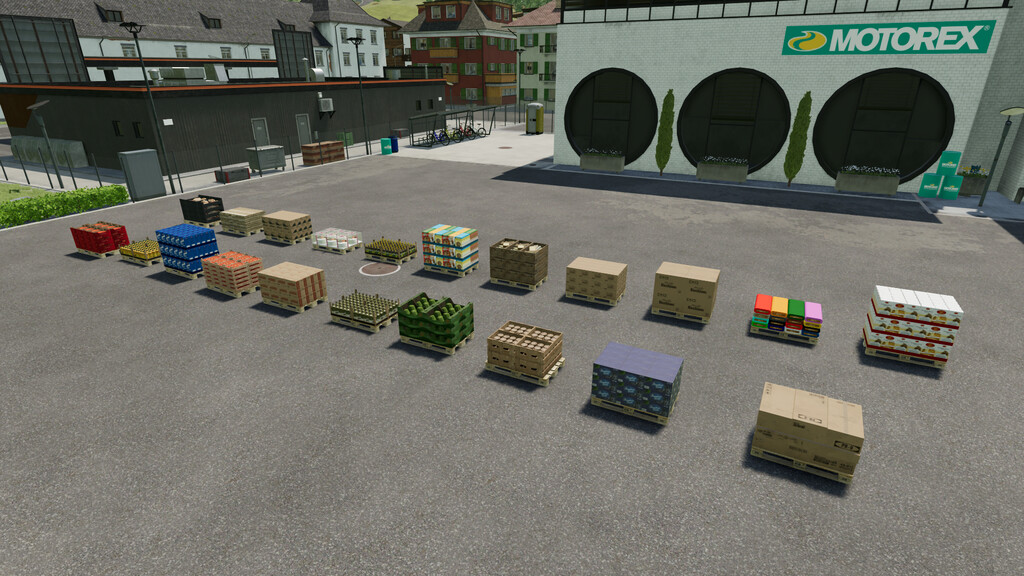
Pallet Additional Features v 1.0.0.3

This automatically modifies all pallets from the base game and the features listed below will apply to all new pallets on your farm.
All pallets are now been available in the game store.
Enhanced functionality to pallets:
– added the possibility to load all compatible vehicles with pallets – Example the mod: Lizard Rumbler Van
– added the ability to unload any product of the game on the respective pallet of all compatible vehicles – Example the mod: Lizard Rumbler Van
– added the ability to attach all pallets to all compatible vehicles – Example the mod: CSZ pallet fork
– all pallets can be connect with telehandler, skid steer, front loader or wheel loader (WITHOUT any attachment, USE ONLY THE VEHICLE)
– added new pallets for products that the game did not include a product pallet
– all pallets can be sold directly without transporting them to the point of sale
– all pallets of this mod have been added in the game store
– all production points, after installing this mod, will use and create the new pallets of this mod
– all animal production points, after installing this mod, will use and create the new pallets of this mod
Version 1.0.0.3:
* Added new 3d model for wood pallet
* Various minor functional fixes
DD ModPassion
Farming Simulator 22
How do I install Farming Simulator mods?
Find a mod that you like and want to download first. Then, on your PC, download a mod. Mods are typically in.zip format. However, it is sometimes in.rar format. If the mod file is in.zip format, no additional actions are required. If a file is in.rar format, you must unarchive it using software such as WinRar or Zip7. Windows 10 users do not need to use archive software; Win10 includes an unarchive feature.
The next step is to locate the mods folder on your computer. It is typically found in Documents/My Games/Farming Simulator [Your FS game version, e.g. 2022]. Open the "mods" folder and place the downloaded.zip archive or unarchived.rar file there.
The final step. Have fun with Farming Simulator mods!