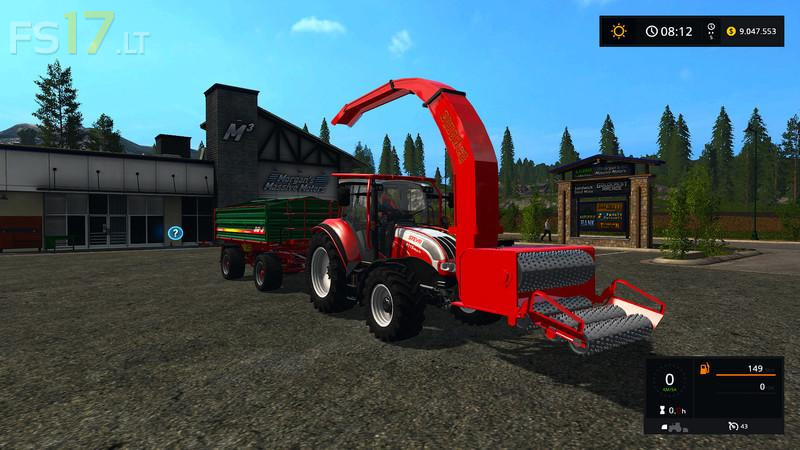
Wood Crusher v 1.1 Multicolor
About the mod:
Version 1.1:
* The problem of not seeing the woods on the ground was partly eliminated
Credits:
Darken-B
How to install FS17 mods?
Firstly find a mod which you like and want to download. Then download a mod to your PC. Mods are usually in .zip format file. But sometimes it can be in .rar. If a mod file is a .zip format no needed additional actions. If a file is in .rar, then you must unarchive mod with software like WinRar or Zip7. Windows 10 users no need to use software for archives, Win10 itself has a feature to unarchive files.
The next step is to find mods folder in your PC. Usually, it is in Documents/My Games/Farming Simulator 17/2017. Open the "mods" folder and put downloaded .zip archive or unarchived .rar file to this folder.
Last step. Enjoy of FS17 mods!



la buse ne détecte que par intermittence les bennes ; a revoir svp sinon super mod
Beau gadget, s’il fontionnerait bien…
Il bug souvent…
Du potentiel mais a retravailler!!!
I tried this and does not work at all.
1. will not process trees at all.
2. will not shut off, even when turning it off.
3. Warning: Invalid wheelIndex ‘3’ in ‘C:/Users/ken/Documents/My Games/FarmingSimulator2017/mods/Wood_Crusher_by_db_v1_0/crusher.xml’
4. does not lower right, front of machine goes in the ground thru map.