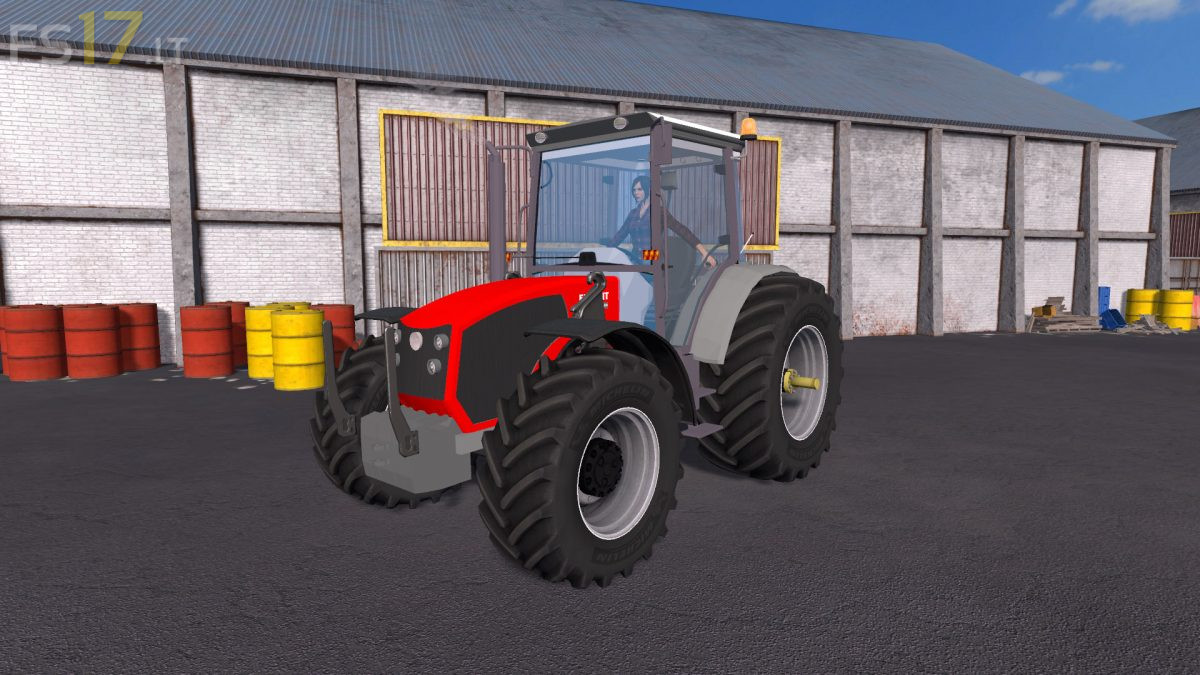
Erkunt Kudret Luks 100 v 1.0

FS19 mods

About the mod:

– Engine Setup: 190 hp, 230 hp
– Frontloader Attacher
– Selectable Attachers
– Selectable Wheels
– IC Control
– Washable

Credits:
Ataberk (RedeX)

How to install FS17 mods?

Firstly find a mod which you like and want to download. Then download a mod to your PC. Mods are usually in .zip format file. But sometimes it can be in .rar. If a mod file is a .zip format no needed additional actions. If a file is in .rar, then you must unarchive mod with software like WinRar or Zip7. Windows 10 users no need to use software for archives, Win10 itself has a feature to unarchive files.

The next step is to find mods folder in your PC. Usually, it is in Documents/My Games/Farming Simulator 17/2017. Open the "mods" folder and put downloaded .zip archive or unarchived .rar file to this folder.

Last step. Enjoy of FS17 mods!

4 thoughts on “Erkunt Kudret Luks 100 v 1.0

  • Sokuk says:
    2018-11-01 at 20:01

    Amına koyayım siktiboktan bir traktör yapmışınız, birde adını vermiş traktöre rezilliğe bak, insan utanır lan 😀 Siktimi dangalağı, ben olsam bari başka ad koyarımda bari rezil olmasın.

    • UMUT says:
      2018-11-19 at 15:37

      YAPACAĞIN YORUMA SOKAYIM SALAK ERKUNT KUDRET LUX 100 TRAKTÖRÜN ORİJİNAL ADI. yorum yapmayı bile bilmeyen adamlar milletin emeğini küçümsüyor cahil

    • Cahil Savar says:
      2019-06-21 at 12:42

      Gördüğüm en cahil insanlardan birisin. Yerinde olsam en az sen kadar andaval olan bu yorumunu silerim sayın gerizekalı 🙂

  • annenehentaicekiyom says:
    2022-01-26 at 19:49

    olum yapacağın modu sikiyim benim taşaklarım bile daha güzel görünüyo aq bi kere dreksyon hareket etmiyo adam kontrol paneline bile uğraşmamış direk foto koymus kabinin içinde renk yok sadece kaputa çalışmış olum sikimsonik modlar yapıp mod diye getiriyolar erkuntla alakası yok

Leave a Reply

Your email address will not be published. Required fields are marked *