

Lights Symbol HUD v 1.0.1.4

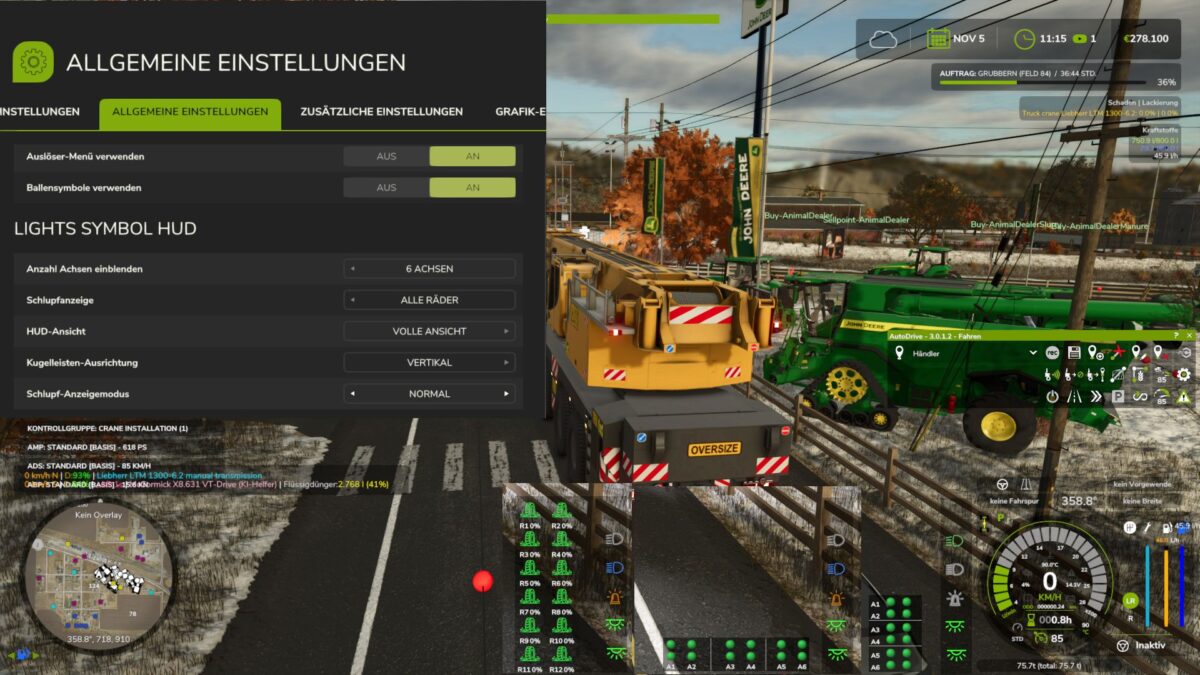
Lights Symbol HUD v 1.0.1.4

The Lights Symbol HUD displays the vehicle’s most important lighting and chassis information clearly in a separate HUD.
Low beam, high beam and work lights
Beacon light
Left/right indicators and hazard warning lights
Turn signal arrows follow the active indicator rhythm
Slip display for driven axles and wheels
Automatic detection of chassis and axles, even with complex multiple, belt and tracked drive systems
Dynamic display of up to 6 driven axles
Axle pairs or individual driven wheels can be selected
Three HUD views: Full view, Compact view and Minimal view
Minimal view optionally with a vertical or horizontal ball light bar
Ball light bar with separate slip statuses and a clear axle assignment
Adjustable slip display: Direct, Normal or Calmed
Adjustable number of displayed axles: 0, 2, 4 or 6
Separate black background for the minimal ball light bar
Version 1.0.1.4:
* Some language entries updated
duestereLegende
How do I install Farming Simulator mods?
Find a mod that you like and want to download first. Then, on your PC, download a mod. Mods are typically in.zip format. However, it is sometimes in.rar format. If the mod file is in.zip format, no additional actions are required. If a file is in.rar format, you must unarchive it using software such as WinRar or Zip7. Windows 10 users do not need to use archive software; Win10 includes an unarchive feature.
The next step is to locate the mods folder on your computer. It is typically found in Documents/My Games/Farming Simulator [Your FS game version, e.g. 2022]. Open the "mods" folder and place the downloaded.zip archive or unarchived.rar file there.
The final step. Have fun with Farming Simulator mods!