
Realistic Overflow v 1.1

FS25 mods

Realistic Overflow v 1.1

1 Star2 Stars3 Stars4 Stars5 Stars
About mod:

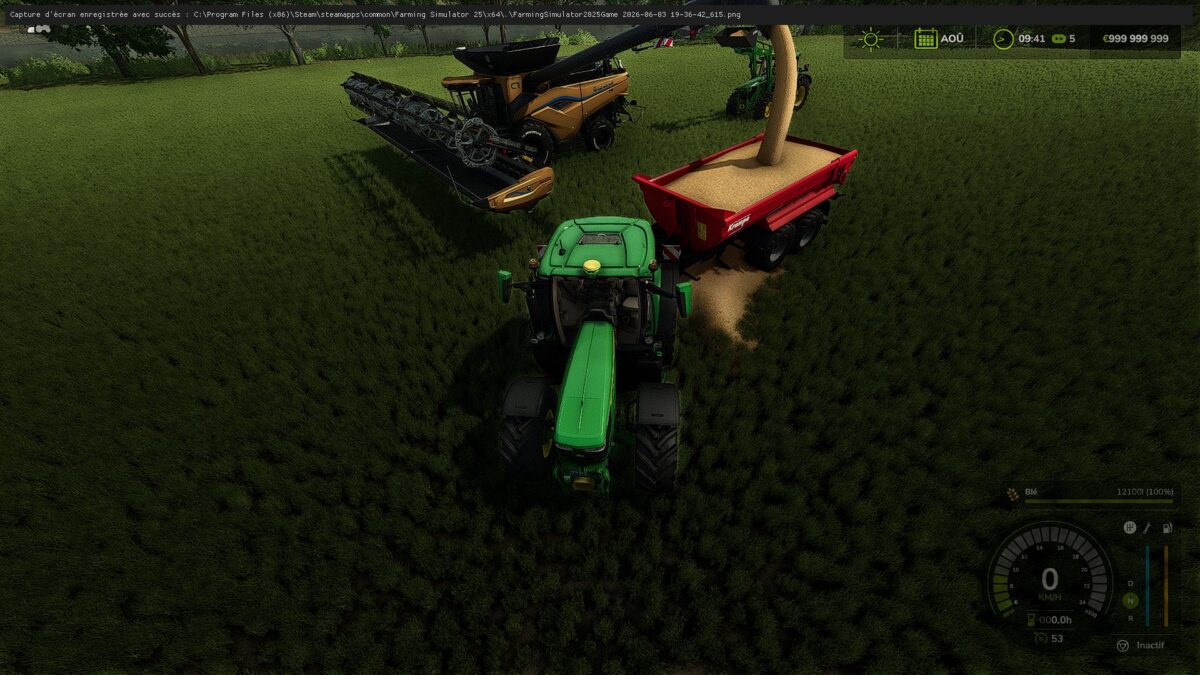
This mod simulates the realistic overflow of open containers in Farming Simulator 25.
When you fill a dumpster, trailer or other open container to its maximum capacity and continue pouring into it, the excess automatically falls to the ground in a collectable pile — just like real farming life.

Compatible with all vehicles and tools:
Buckets and front loaders
Telescopic
Combine harvesters — be careful, if your trailer is full while unloading the bucket, the excess will spill onto the ground
Forage harvesters — same vigilance, if the trailer is full during harvest, the excess falls to the ground
All vanilla vehicles in the game
Compatible with the vast majority of vehicle mods

Works with all bulk products:
Wheat, barley, corn, rapeseed, silage, solid manure and all products that can be loaded using a bucket or front loader.

Not compatible with:
Milk, fuel, water, liquid fertilizer, slurry and any closed container — these products cannot overflow by nature.

Version 1.1:
* Heap position corrected excess now falls to the side and no longer under the trailer
* More realistic overflow quantity
* Multiplayer support added

Credits:

Firmin

* By clicking [Download this mod from filehost] button you agree to leave this website. The link opens in the new tab. File is hosted in the external website. We are not responsible for the content of the external page and the possibility of free download of the file.

How do I install Farming Simulator mods?
Find a mod that you like and want to download first. Then, on your PC, download a mod. Mods are typically in.zip format. However, it is sometimes in.rar format. If the mod file is in.zip format, no additional actions are required. If a file is in.rar format, you must unarchive it using software such as WinRar or Zip7. Windows 10 users do not need to use archive software; Win10 includes an unarchive feature.

The next step is to locate the mods folder on your computer. It is typically found in Documents/My Games/Farming Simulator [Your FS game version, e.g. 2022]. Open the "mods" folder and place the downloaded.zip archive or unarchived.rar file there.

The final step. Have fun with Farming Simulator mods!

Leave a Reply

Your email address will not be published. Required fields are marked *