

Realistic Shopping v 1.0.1.0

Realistic Shopping v 1.0.1.0
Realistic Shopping changes the vehicle shop into a more realistic dealer experience with delayed deliveries, shop access rules, and optional rush delivery.
Features:
Delayed delivery orders for purchases and leases
Optional Instant Buy and Instant Lease buttons with a rush delivery fee
Delayed buy-only orders for pallets, bales, bags, fertilizer, seed, lime, and herbicide
Pending orders are saved per savegame and shown until available
Pending order cancellation with a 5% cancellation fee
Movable pending orders HUD
Hire Purchase compatibility with delayed delivery
10-second shop processing timer to reduce duplicate buy/lease conflicts
In-game settings menu follows the game language automatically
Shop access restrictions:
The shop can require the player to be near the vehicle shop/dealer area
Shop hours: open 6:00 am-12:00 pm and 1:00 pm-8:00 pm
Closed for lunch from 12:00 pm-1:00 pm
Closed overnight from 8:00 pm-6:00 am
The closed-shop message shows when the shop opens again
Shop setup:
Basegame shop points are included for Riverbend Springs, Hutan Pantai, Zielonka, and Kinlaig
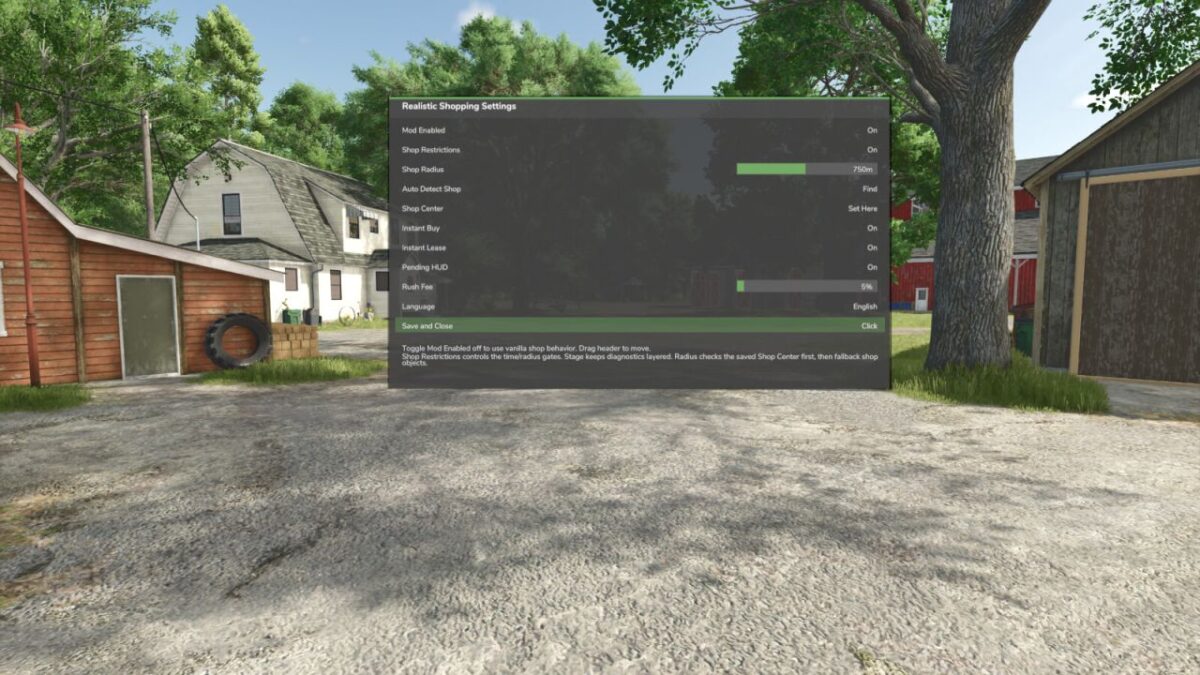
Shift + R opens the Realistic Shopping settings menu
Use Auto Detect Shop to detect the dealer area
Use Shop Center to manually save the current position on unsupported or custom maps
Adjust Shop Radius in the same menu if needed
Shop restrictions can be disabled from the settings menu
Version 1.0.1.0:
* Added expanded Hire Purchase compatibility for Realistic Shopping orders
* Added delayed delivery support for Hire Purchase purchases
* Added Instant Hire Purchase with the Realistic Shopping instant purchase fee
* Added pending Hire Purchase finance entries while orders are waiting for delivery
* Added automatic Hire Purchase finance cleanup when pending orders are canceled
* Added delivery binding so delivered vehicles are connected to their Hire Purchase finance entries
* Added delivery verification so orders stay pending if a vehicle cannot be verified after delivery
* Improved delivery spawning to use the current saved shop location
* Improved Hire Purchase shop button placement and compact labels for different screen sizes