

Slurry Pipe System v 1.0.0.5

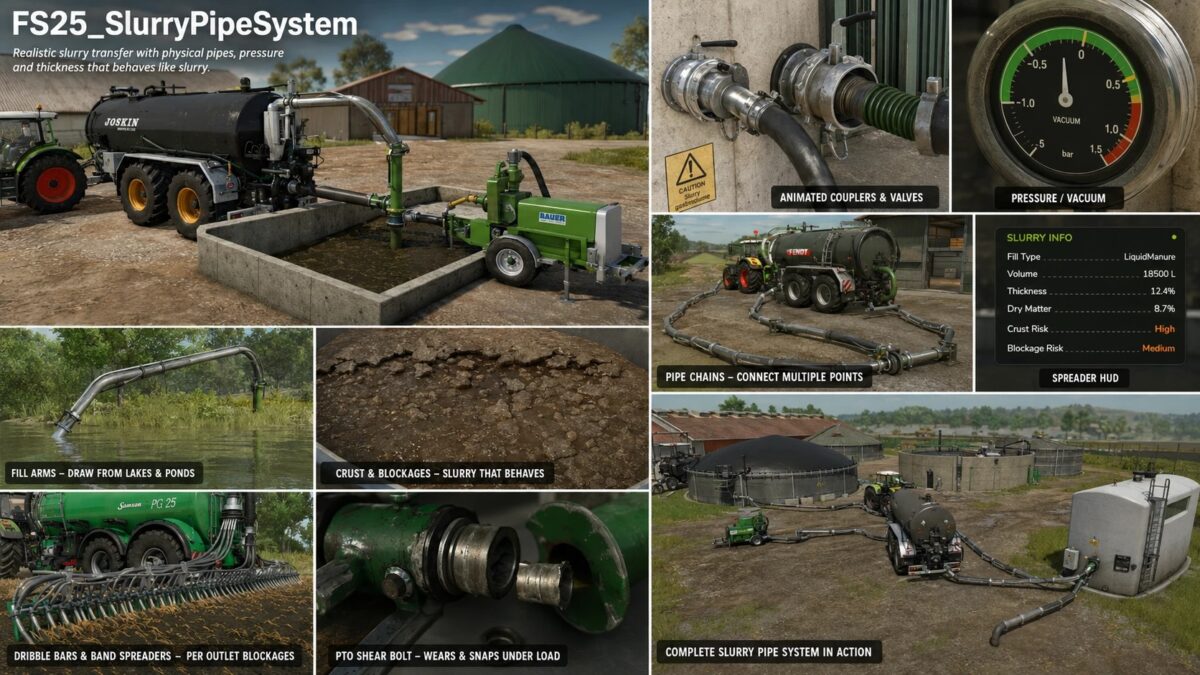
Slurry Pipe System v 1.0.0.5
A realistic slurry pipeline system for Farming Simulator 25.
The FS25 Slurry Pipe System (SPS) replaces the simplified vanilla mechanics of the game—simply drive up to a trigger and fill with a fully interactive pipeline system.
Physically connect filling arms or pipes, operate a PTO-driven pump, build up pressure, control the flow direction, and watch the slurry actually move through a connected pipeline system.
The slurry itself behaves realistically: it becomes more viscous over time, forms crusts if not regularly stirred, and can clog pipes or distributors if neglected.
Replaces vanilla drive-in slurry filling with a realistic physical pipe and pump system. Connect fill arms or pipes to a slurry source, run a PTO-driven pump, build pressure, and control the flow before anything moves.
Controls:
– Pump On/Off: starts the pump. Required before any pumped flow.
– Pipe Valve: opens the pipe circuit for filling or discharging.
– Spreader Valve: opens the spreader discharge.
– Direction: switches between fill and discharge.
Features:
– Open-pit fill arms with slurry surface detection
– Rubber boot port docking
– Multi-segment pipe chains and direct pipe couplings
– Tanker-to-tanker transfer and nurse tank operation
– Conduit (PTO) pump trailer for chain-to-chain transfer
– Pressure model: vacuum, high-volume-pump and open-top vessel types
– Slurry physics: it thickens, crusts and can block spreaders; mix or add water to keep it flowing
– Dribble bars and band spreaders with per-outlet blockage and a spreader HUD
– Fertiliser / herbicide sprayer support
– Water intake from map lakes and ponds
– Optional PTO shear bolt
– Coloured pipes, saved per game
– Works with LIQUIDMANURE and DIGESTATE
– Compatible with Manual Attach
– Multiplayer compatible
Version 1.0.0.5:
* Changes made for bug fixes and updates