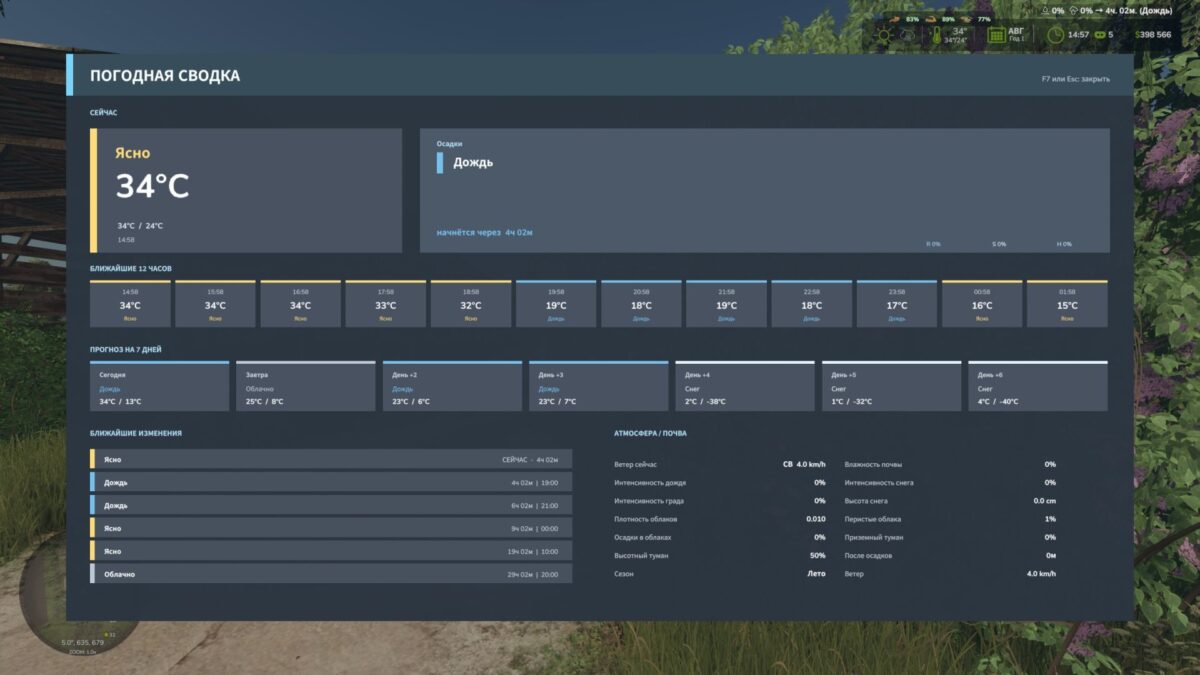
Weather Information HUD v 1.0
Weather Information HUD adds advanced and beautiful weather reports to Farming Simulator 25 right on top of the game interface.
The mod shows not only short information about the current weather, but also a full forecast with details.
Management:
LALT + F6 – open or close the weather report
Esc – close the panel
BMProd
How do I install Farming Simulator mods?
Find a mod that you like and want to download first. Then, on your PC, download a mod. Mods are typically in.zip format. However, it is sometimes in.rar format. If the mod file is in.zip format, no additional actions are required. If a file is in.rar format, you must unarchive it using software such as WinRar or Zip7. Windows 10 users do not need to use archive software; Win10 includes an unarchive feature.
The next step is to locate the mods folder on your computer. It is typically found in Documents/My Games/Farming Simulator [Your FS game version, e.g. 2022]. Open the "mods" folder and place the downloaded.zip archive or unarchived.rar file there.
The final step. Have fun with Farming Simulator mods!